
TIP 6 – Choose the right chart (visual)
From Data Confusion to Clarity: How the Right Chart Changes Everything


Choosing the right chart is one of the fastest ways to make data feel “obvious” instead of overwhelming. A good visual matches the question you’re answering. It should clearly show the comparison, trend, relationship, or distribution. This way, the insight pops at a glance. When you pick the wrong chart, you force your audience to work harder, or worse, you accidentally mislead them.
This is from the series of TOP 30 Tips in Data Storytelling.
“A visual is great only if it changes what your audience does with the information.” Unknown
Beautiful and Useful: How to Design Charts That Drive Decisions, Not Confusion
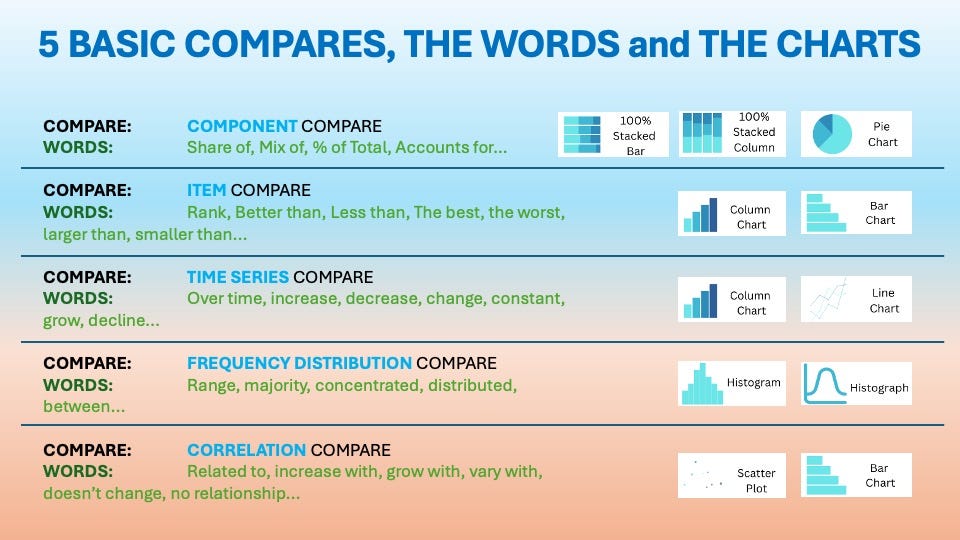
Start from the question, not the tool. If you want to compare categories, you’re in bar-chart territory. If you want to show how something changes over time, you likely need a line chart. If you’re exploring relationships between two numeric variables, reach for a scatter plot. If you care about how often values occur, you want a frequency chart such as a histogram. Most day‑to‑day business questions have simple solutions. They can be answered with just a handful of chart types: bar, column, line, scatter, and histogram. These charts must be used correctly.
Example: Customer Care

Rough Situation: What causes the most complaints?
How not to do it:
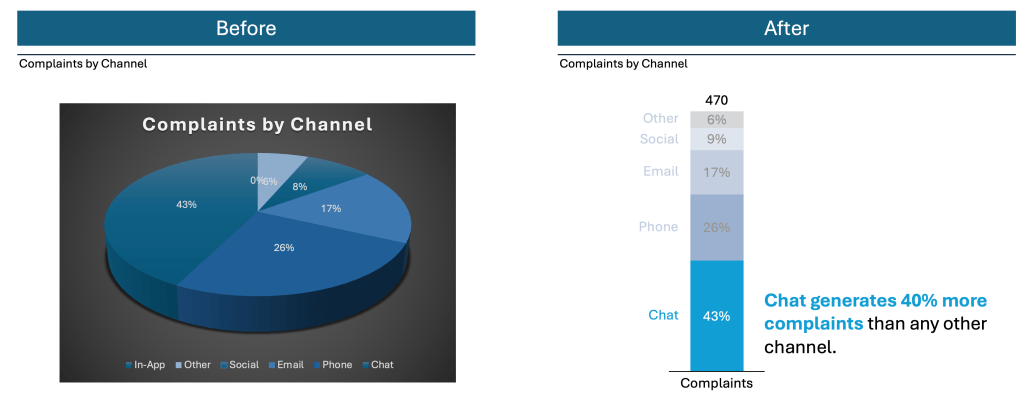
A Customer Care manager wants to show which channels (phone, email, chat, social) receive the most complaints. They use a 3D pie chart instead of a bar chart. It has eight thin slices, including minor channels. The slices are similar in color and have no direct labels. The differences between slices are hard to judge, and the 3D tilt distorts size.
The team walks away unsure which channel actually dominates volume and where to prioritise staffing. This breaks the basic guidance that comparisons between categories are best made with bars, not complex pies or 3D effects.
How to do it:
The manager switches to a simple vertical bar chart. It has one bar per channel, sorted from highest to lowest complaint volume. The y‑axis starts at zero. Each bar is clearly labeled with counts. Only one highlight colour is used for the top problem channel. Within seconds, everyone can see “Chat generates 40% more complaints than any other channel.” This method is more effective.
Bar length is easy to compare. Sorting makes the ranking obvious. The zero baseline prevents exaggeration. It turns a vague impression into a clear action: “Fix chat flows and staff that queue first.
Once you know the purpose, keep the design simple: clear labels, sensible scales, minimal clutter, and highlighting only what matters. Bar charts should start at zero to avoid exaggerating differences. Line charts should use consistent time intervals. All charts should avoid too many colors or overlapping series that obscure the pattern. A well-chosen chart is both beautiful and functional. It is honest about the data. It instantly communicates the message you care about.
Example: Supply Chain

Rough Situation: Where is the relationship?
How not to do it:
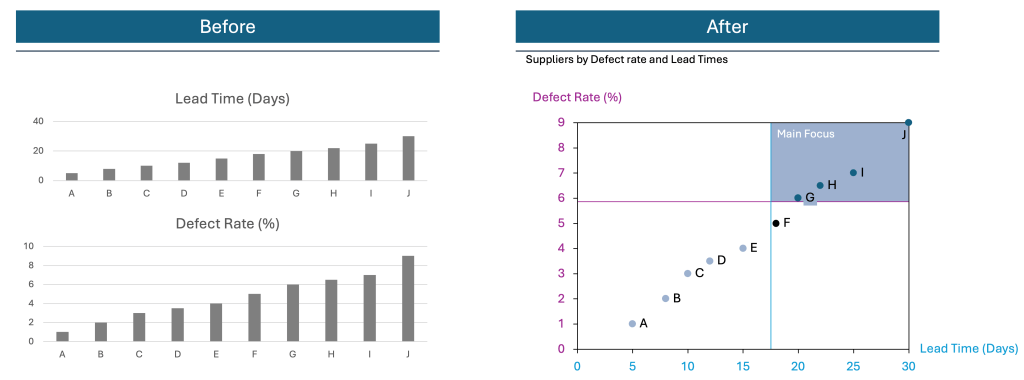
A Supply Chain analyst wants to explore whether longer supplier lead times are linked to higher defect rates. They create two separate bar charts. One is sorted by lead time. Another is sorted by defect rate. Each chart contains dozens of suppliers. Viewers have to mentally cross‑reference supplier names to determine whether long-lead-time vendors are also high‑defect vendors.
The relationship is nearly impossible to see, and any talk about “correlation” feels hand‑wavy. This is a classic case of using a comparison chart when a relationship chart is needed.
How to do it:
The analyst creates a scatter plot instead. Each dot is a supplier. The lead time is on the x‑axis, and the defect rate is on the y‑axis. A visible upward pattern appears: dots drift up as they move right, and a few outliers stand out. They add a trendline and highlight the worst offenders in a different colour.
Now the link between longer lead times and higher defects is instantly visible. The team can target specific vendors for renegotiation or quality programs.
This is better. Scatter plots are designed to show relationships between two numeric variables. This makes the correlation clear in a single view rather than two disconnected charts.
5 Basic Compares and Charts
Example: Accounting

Rough Topic: Do we have a risk or don’t we?
How not to do it:
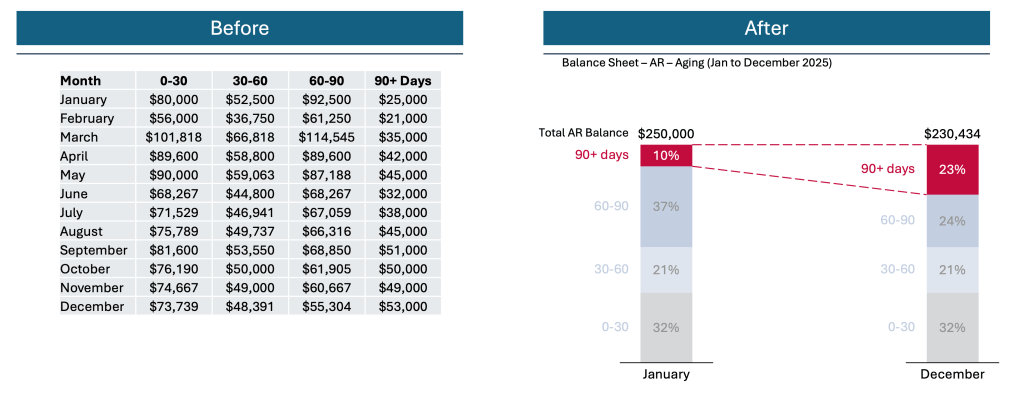
An Accounting manager wants to show that receivables risk is rising. They project a raw AR aging table from the ERP onto a slide. The table includes dozens of rows with columns for Current, 31–60, 61–90, and 90+ days. It also shows a single “Total AR: 2.5M” and maybe an average days outstanding. Leadership sees a dense spreadsheet with lots of numbers. They cannot instantly tell whether the 90+ day bucket is large or growing. They also struggle to determine how much AR is actually at risk.
The conversation stalls on individual customer lines. It focuses on minor corrections rather than the big picture. This happens because there is no clear visual of the aging distribution or trend.
How to do it:
The same manager reframes the story: “Our receivables are getting older. Our 90+ day bucket has more than doubled in three months.” They display one bar chart of the current AR aging buckets (Current, 31–60, 61–90, 90+). The risky 61–90 and 90+ buckets are highlighted in a warning colour.
This makes it obvious at a glance that a large share is overdue. Next, they add a simple line or column chart of the 90+ bucket over the last three months. The chart shows a clear climb from 200k to 500k. In less than 10 seconds, leaders see the distribution now. They also observe the worsening trend.
This naturally leads to decisions on collection focus, credit holds, or write‑offs. This is better because it changes a wall of aging data into a visual risk story. This story is easy to grasp. It also prompts action quickly. It prevents stakeholders from having to hunt for problems inside a table.
Leveraging new tools, such as Gen AI, is very helpful for this tip.

Ask “What chart should I use?”
Paste a short description of your data and question, e.g., “I have monthly AR aging buckets (Current, 31–60, 61–90, 90+). I want to show that risk is shifting into 90+. What chart type should I use?”
Gen AI can recommend a bar chart, stacked bar, or line for trends, and explain why (comparison vs trend vs relationship vs distribution)
Get before/after redesign ideas for bad charts
Paste or describe an existing chart: “I’m using a 3D pie chart to show complaints by channel. Make this clearer.”
Ask: “Describe a better chart type, axis setup, sorting, colour scheme, and title.”
You get a concrete spec (e.g., “sorted vertical bar chart, zero baseline, top channel highlighted”) you can replicate in Excel/Power BI
Generate “insight titles” for your visuals
Provide the data summary and say: “Write 3 chart titles that state the key message, not just the data label.”
Example output: “Chat Drives 40% of Complaints” instead of “Complaints by Channel.” This makes the chart’s message obvious at a glance.
Summary – From insights to action
The right chart makes your data’s message obvious in seconds; the wrong chart buries it in confusion or distortion. Bar charts excel at comparisons. Line charts bring trends to life. Scatter plots uncover relationships. Histograms reveal hidden patterns in frequency and distribution. When you align chart type to purpose and keep the design clean, your visuals become both beautiful and brutally clear.
For your next report or dashboard, take a cluttered or confusing visual and improve it. First, ask what question it should answer. Next, switch to the chart type that best fits that question. Finally, strip away anything that doesn’t support the main message. Transform a single, unimpressive chart into a sharp and honest visual. You’ll notice how quickly your audience understands. They will act promptly.
For free resources to help you on your Data Storytelling Journey, click here.
To keep Transforming Your Data Storytelling Journey, sign up for regular Insights.
Interesting examples